
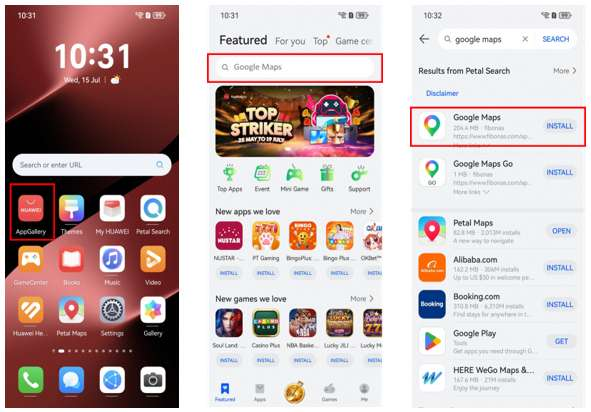
If you have just switched to a Huawei phone, maps are usually one of the first things you check. You want directions to work, saved places to be easy to find and location sharing to behave normally. The answer is not the same on every Huawei model, because Google services depend on the phone’s software and whether Google Mobile Services are available.
Start with what your phone already supports
On Huawei phones that include Google Mobile Services, Google Maps can work much like it does on other Android devices. On newer models without GMS preinstalled, the situation is different. You may still be able to open Google Maps in a browser, but app login, saved history and other account-based features can vary.
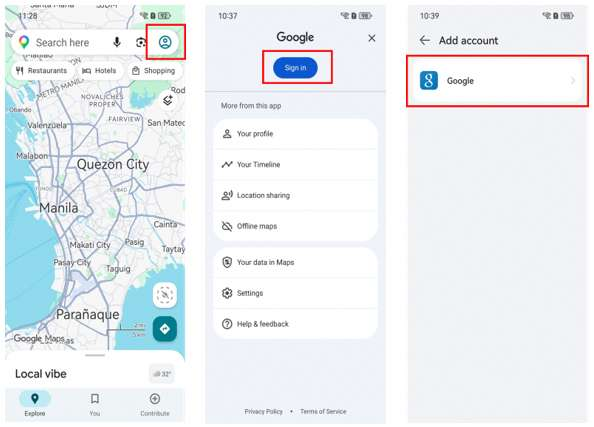
That is why does huawei have google maps is better treated as a compatibility question than a simple yes-or-no question. Check the exact phone model and software version before following an installation guide written for another device.
The browser is often enough for basic navigation
If you mainly need to search for an address, inspect an area or plan a route, the Google Maps website can be a practical option. Huawei support has recommended browser access for Google services on some devices that do not support Google apps directly.
A browser shortcut on the home screen can make this feel less awkward in daily use. It also avoids installing multiple copies of the same service from unrelated sources.
Petal Maps is worth keeping as a fallback
Huawei’s own Petal Maps is another option, especially when you want an app that is designed around Huawei Mobile Services. Huawei also provides a way to import starred places exported from Google Maps into Petal Maps, which is useful if you are moving from an older Android phone.
Try both for the routes you actually use. Check search results, public transport information, voice guidance and location accuracy in your area rather than deciding from the app name alone.
Set up the rest of your travel apps at the same time
Maps rarely work in isolation. Test ride-hailing, airline, hotel, banking and messaging apps while you still have reliable Wi-Fi. If location is wrong, check the phone’s location permission and network connection before reinstalling the map app.
The Huawei Community guide linked through does huawei have google maps is a useful starting point for the Google Maps question. In practice, the best setup may be Google Maps in a browser, Petal Maps as the main navigation app, or a mix of both depending on the country and the device.